
Geekbot vs Progreps: Which Is Better for Individual Progress Tracking?

What “individual progress tracking” actually means (and why most tools get it wrong)
Progress tracking sounds simple until you try to do it for yourself instead of a team. Most people think it means writing down tasks as they finish them. That is only half the picture. Real progress tracking captures outcomes, small wins, learning, and impact. It is not a task list dressed up in new branding.
This matters most for individual contributors, freelancers, consultants, and anyone who has to explain their value later. Designers, engineers, marketers, project managers, and agency staff all hit the same wall. They forget what they actually did. Notes get scattered across Slack, Notion, and Jira. By the time a review or client update comes around, the details are gone.
That failure mode is the reason this comparison exists. We are looking at progress tracking through four lenses: motivation, recall, reporting, and narrative building. Geekbot is strong at team check-ins and has earned its place there. Progreps was built specifically for personal progress and review-ready narratives, which is a different job entirely.
Quick overview: Geekbot vs Progreps at a glance
Geekbot is a Slack-based tool built for standups and async check-ins. It runs on configurable questions and recurring prompts, mostly aimed at teams. It answers the question “what is my team doing this week.” That is a valuable question, just not the one most individuals are asking.
Progreps takes a narrower and more personal approach. It gives you a simple routine to set weekly priorities, capture wins on a schedule, and receive progress reports built for reviews and client updates. It answers “what have I actually accomplished, and can I prove it.”
This is bottom-funnel territory. You are not choosing based on features alone. You are choosing based on outcomes for your own progress tracking habit. As a quick rule of thumb, Progreps fits individual contributors preparing progress reports. Geekbot fits teams that need shared visibility and async status updates.
How we’re comparing them (the only criteria that matter for personal progress)
Not every criterion matters equally when the goal is individual progress tracking. We narrowed this down to six that actually move the needle for a single person trying to track their own work.
Priority alignment asks whether the tool connects your daily work back to what matters this week. Capture friction asks whether you can log a win in under a minute, consistently, without dreading it. Momentum and motivation ask whether the tool helps you notice progress even on slow days.
Review-ready reporting asks whether the tool produces summaries you can actually use, not just raw logs. Personalization covers frequency, timing, reminders, and vacation mode for pausing check-ins. Ownership and portability ask whether you can find, reuse, and shape your own narrative later.
Both tools can technically “collect updates.” Only one of them is designed from the ground up to turn those updates into individual impact narratives you can hand to a manager or a client.
Geekbot for individual progress tracking: where it fits (and where it starts to bend)
Geekbot’s core workflow is straightforward. It sends scheduled questions inside Slack or Microsoft Teams, and people answer them for standups, retros, or pulse checks. For a manager trying to run async standups, this works well.
For an individual doing their own progress tracking, some of it still holds up. The prompts are lightweight and help build a routine. Chat history is searchable, and answering daily keeps you accountable in a loose sense.
Where it starts to bend is the intent behind the updates. Geekbot answers are optimized for broadcasting status to a channel, not for building a personal record of impact. Signal gets lost in threads and channels over time. The structure of your updates is inconsistent week to week, since it depends on whatever the team’s standup questions happen to be.
If you ever need to compile a review narrative from Geekbot history, you are doing that work manually. You are scrolling, copying, and reconstructing months of scattered messages. Geekbot fits best when you already live in Slack, need shared visibility, and the cadence is driven by your manager or team, not by your own goals.
Progreps for individual progress tracking: the workflow is the feature
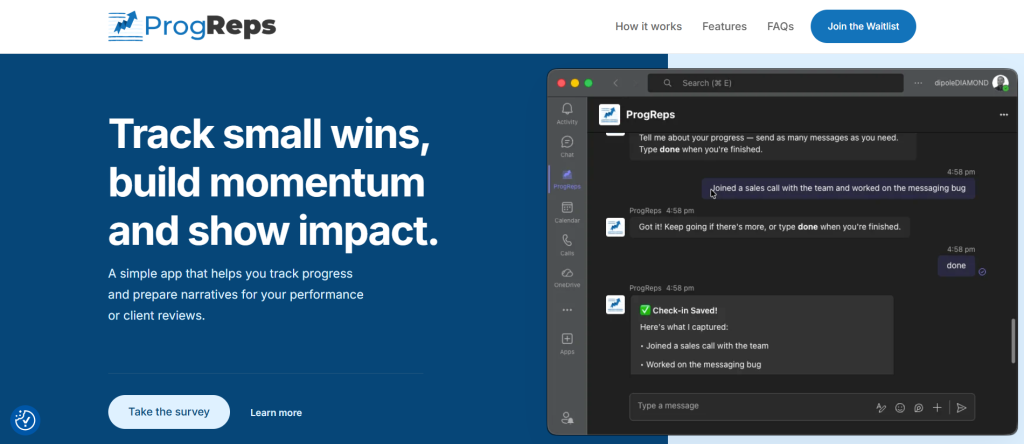
Progreps was built around a different premise. Track small wins, build momentum, and show impact when it counts. That framing shapes everything about how the tool works, and it is the reason this section exists as its own category.
The routine has three steps. First, you set your priorities at the start of the week, defining what a good week actually looks like. Second, you get scheduled check-ins throughout the week to capture your wins as they happen. Third, you receive periodic progress reports that turn those entries into something usable.
The under-a-minute capture design matters more than it sounds. It removes the review-time stress of trying to remember three months of work in one sitting. Instead of recalling everything from memory, you already have it recorded.
The narrative-building piece is what separates this from a basic logging app. Daily entries get organized into structured summaries mapped back to your original priorities. You can adjust check-in frequency and timing, turn on reminders, or flip on vacation mode when you are out. Progreps fits ICs who need performance review examples, freelancers preparing client updates, and anyone who genuinely forgets what they accomplished by Friday.
Head-to-head: priorities, wins, and reports (the real comparison)
Here is where the two tools diverge in practice, not just in marketing language. This table is not a recap of what was already said. It is a reference you can come back to when deciding which tool fits your actual week.
| Situation | Geekbot | Progreps |
|---|---|---|
| You missed three check-ins this week | Gaps sit unresolved in the channel | You can add entries later without losing anything |
| You need a report for a self-review | You compile it manually from chat logs | Reports are generated automatically for you |
| Your manager wants team-wide visibility | Built for exactly this | Not the primary use case |
| You want to pause tracking for two weeks | Requires manual admin changes | Vacation mode pauses check-ins directly |
| You want your update tied to weekly priorities | Not built into the workflow | Priorities are set first, then wins map to them |
The pattern here is consistent. Geekbot is administratively strong for teams. Progreps is structurally built around individual progress tracking from priority to win to report.
Use-case breakdown: which tool is better for your exact situation?
If you are an individual contributor preparing for performance reviews, Progreps is built for structured examples and clean summaries. You are not reconstructing your year from memory in the week before your review.
If you are a freelancer or consultant sending client updates, Progreps works as a weekly impact report generator. It helps you avoid missing deliverables or forgetting outcomes you actually delivered. If you handle multiple clients, it is worth pairing this with a look at the best tools for consultants to track client impact and deliverables.
If you are part of a team running async standups, Geekbot’s strength is shared visibility. It can still complement personal progress tracking if you layer Progreps on top for your own record.
If you manage multiple projects at once, you need priority recall and fast wins capture without extra mental overhead. The Progreps routine reduces context switching by keeping everything tied to your weekly priorities.
If you hate the idea of “another app,” it helps to separate two things. One is adding more software to your day. The other is removing the review-time stress of scrambling to remember your own accomplishments. Progreps is closer to the second thing than the first.
What makes Progreps stand out for bottom-funnel buyers (the specific advantages that matter)
Progreps is designed around “what I did,” not “what I plan to do.” That is the core difference between it and a task manager or a status bot. Task managers look forward. Progreps looks back and captures what actually happened.
The small wins system helps you notice progress even when your output feels invisible. Some weeks do not produce a big launch or a shipped feature, but they still contain real progress worth recording.
Automatic alignment to priorities closes the gap between your daily work and your weekly goals. You are not just logging tasks in isolation. Every entry connects back to something you said mattered at the start of the week.
The reports are review-ready by design. You can paste them into a self-review, a 1:1 update, or a client email without heavy editing. Entries take under a minute, reminders are gentle, and you can add missed days later without losing your streak.
Preference controls round this out. You choose your schedule, your frequency, and whether vacation mode is active to prevent notification fatigue. Progreps functions as a personal progress tracker that doubles as a narrative generator, which is the exact gap Geekbot leaves open for individuals.
If you want to see how this connects to bigger career conversations, it is worth reading about what an impact export is and how it can help your career. It is also worth understanding how to fix recency bias in your performance review, since that bias is exactly what consistent progress tracking corrects.
Common objections (and how to decide in 5 minutes)
“Isn’t this just a to-do list?” No. A to-do list tracks what you plan to do. This tracks what you actually did, and turns it into a narrative you can use later.
“Will it feel like extra work?” It takes less than a minute now. The alternative is hours later trying to reconstruct a year of work from memory.
“What if I forget to log something?” Reminders handle most of that. You can also add entries later, so nothing gets permanently lost.
“We already use Geekbot at work.” That is fine, and the two are not mutually exclusive. Geekbot can stay for team visibility while Progreps handles your personal narrative and review prep.
If you need weekly priorities, wins capture, and clean reports, choose Progreps. If you need team standups inside Slack, choose Geekbot. Most people only need one of the two for their own progress tracking.
Recommended setup: how to get the best results with Progreps (simple routine)
Start each week with a kickoff. Set three to five priorities that define what a good week looks like for you. Keep the list short enough to actually remember.
Choose a check-in cadence that fits your role. Daily works well for high-output weeks. Two or three times a week works better if your calendar is packed with meetings.
Log wins, outcomes, decisions, and shipped work as they happen. Include blockers you resolved and anything you learned along the way. Make each entry measurable where you can. Add numbers, links, or the names of the projects involved.
At the end of the week, review your report. Copy the relevant parts into a self-review document, a brag document, or a client update. Keep your schedule realistic and use vacation mode when needed. This keeps the habit sustainable instead of becoming one more thing you abandon after two weeks. If you want a head start, you can join the Progreps early access waitlist and start building this routine before your next review cycle.
Final verdict: Geekbot vs Progreps for individual progress tracking
In one sentence, Geekbot is best for team check-ins, and Progreps is best for individuals who need momentum and review-ready impact reports. Neither tool is wrong. They are simply solving different problems.
If your goal is a performance review narrative or a client-ready update, Progreps is the stronger fit for your own progress tracking. Start with weekly priorities and scheduled check-ins, then judge the results after two weeks based on how useful the report actually is.
Do I have to log things every day?
No, but consistency does produce better results over time. Each check-in takes less than a minute to complete. You get a simple prompt, and you capture whatever moved forward that day. Missing a day is not a problem since entries can be added later.
How is this different from a to-do list or task manager?
To-do lists and task managers are forward-looking by design. They track what you plan to do next. Progreps is backward-looking in a useful way. It captures what you actually did and helps you build a narrative around the impact of that work, which most task managers were never built to do.
What happens if I forget to log my wins for a few days?
You will receive gentle reminders nudging you back into the routine. You can also add entries after the fact, so a missed day or even a missed week does not erase your progress record. Nothing is permanently lost just because you fell behind.
Will using a progress tracking tool feel like extra work on top of my job?
It is designed to reduce work, not add to it. The alternative to daily logging is trying to remember an entire quarter of accomplishments right before a review. That mental reconstruction takes far more time and energy than a minute a day spent capturing wins as they happen.
How does consistent progress tracking actually help with performance reviews?
Daily and weekly entries get automatically organized into clear, structured summaries. By the time review season arrives, you already have concrete examples of your impact instead of a blank page and a vague memory of a busy year. This also helps counter recency bias, where managers tend to remember only the last few weeks of your work.
Can Progreps replace a tool like Geekbot for my team?
Not directly, since the two solve different problems. Geekbot is built for shared team visibility through Slack-based standups. Progreps is built for your own personal progress tracking and narrative building. Many people use Geekbot at work while running Progreps privately for their own review preparation.
