
Best Tools for Consultants to Track Client Impact and Deliverables

To track client impact consistently is arguably the real deliverable in consulting work. Most consultants only realize this after a renewal conversation goes sideways.
You did the work. You ran the workshops, fixed the process, wrote the strategy, and hit the deadlines. But when the client asks “what has this actually changed for us,” you’re scrambling. You’re digging through old emails and Slack threads. You’re trying to reconstruct a story you should have been building all along.
This is the gap between doing good work and being able to prove it. Budgets get scrutinized every quarter. Proof is what keeps you in the room.
Why tracking client impact is the real deliverable
Most consultants are excellent at producing outputs. Decks get built. Reports get sent. Projects get closed on time. What’s harder is connecting that activity to something the client’s leadership actually cares about. That could be a decision that moved faster, a risk that got caught early, or a KPI that finally shifted.
When you track client impact properly, you’re not just keeping yourself organized. You’re building the evidence base for your next renewal, your next referral, and your next rate increase. Clients rarely push back on a fee conversation when they can see, in plain terms, what they got for their money.
Impact here means more than finished deliverables. It includes behavior change on the client’s team, adoption of a new process, movement on a specific metric, and reduced risk exposure. It includes better alignment among stakeholders who used to pull in different directions. None of that shows up automatically in a project plan. You have to capture it on purpose.
What to track so you don’t end up with a messy activity log
A lot of consultants try to solve this by keeping a running list of everything they did. That turns into a wall of text nobody reads, including you, three months later.
A cleaner way to think about it is a simple chain. Inputs, outputs, outcomes, evidence. Inputs are the time and effort you put in. Outputs are the tangible things you produced. Outcomes are what changed because of those outputs. Evidence is the proof you can point to when someone asks “how do you know.”
Weekly, it helps to track a small set of impact signals rather than everything that happened. Track decisions the client made because of your input, blockers you cleared and milestones hit. You can also track adoption numbers if you have access to them. Track direct feedback from stakeholders, anything tied to revenue or cost, and compliance or risk wins that would have gone unnoticed otherwise.
It also helps to separate deliverables from progress artifacts. Deliverables are the finished things, like a roadmap, a PRD, or a final deck. Progress artifacts are the smaller records along the way, like meeting notes, decision logs, and change logs. Both matter. Only one of them tells the story of how you got there.
A lightweight cadence works better than an elaborate system. A minute a day to jot down a win. Fifteen minutes a week to pull it together. Half an hour a month to turn it into a narrative. That’s realistic even during a busy engagement. If you want a concrete example of a daily capture habit, this piece on how to set up a daily check-in routine in Microsoft Teams walks through exactly that.
How to choose the right tool stack without overcomplicating your workflow
The temptation is to adopt five tools at once and use none of them properly. A better approach is what you might call the minimum viable stack. One tool to capture quickly. One to organize and store evidence. One to report. And a way to share results with the client.
When picking tools, weigh a few things. How much friction is involved in capturing something in the moment. Whether the tool lets you tag or link entries to a client priority. How easily it turns raw entries into a summary. Whether the client can see progress without you exporting a document every time. Whether there’s a timestamped audit trail. How well it plays with your calendar and email. And how it handles client data securely.
Your situation changes what you optimize for. A solo consultant juggling three clients needs speed above everything else. A boutique team needs shared visibility so nobody duplicates effort. An enterprise engagement usually needs an audit trail and a formal sign-off built in.
Below is a quick way to match your current setup to the stack that fits. This is more useful than picking the stack that looks impressive on a case study.
| Your situation | Biggest risk without a system | What to prioritize | Realistic weekly time cost |
|---|---|---|---|
| Solo consultant, 2 to 4 clients | Forgetting wins between projects | Fast daily capture, low setup | Under 20 minutes total |
| Boutique team, shared clients | Duplicate work, no single source of truth | Shared evidence hub, tagging by client | 30 to 45 minutes total |
| Enterprise engagement | No audit trail for decisions and approvals | Sign-off tracking, ticket-to-outcome linking | 45 to 60 minutes total |
| Fractional or part-time role | Impact invisible outside your own head | A running narrative you can hand to a manager or client with no prep | Under 15 minutes total |
Progreps for capturing small wins and turning them into client-ready narratives
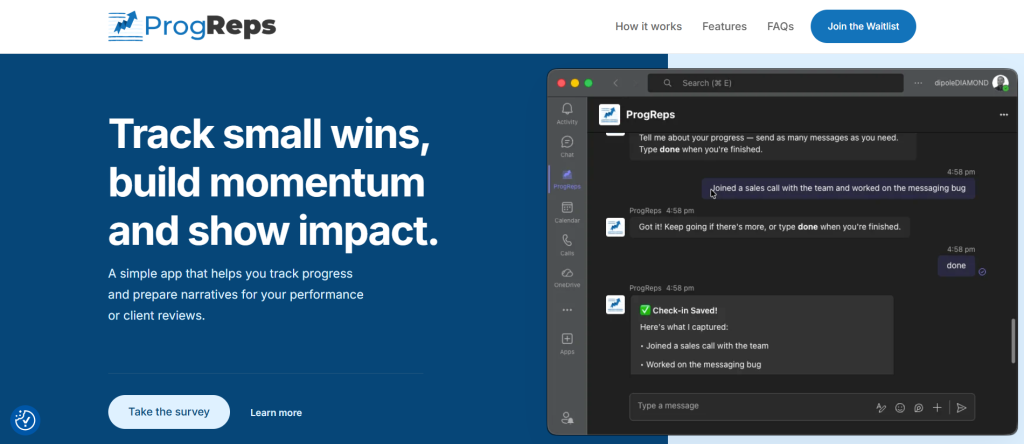
Progreps is built around a fairly simple idea. Instead of another to-do list, it captures what you actually did. It slowly builds that into a narrative you can hand someone during a review or a renewal conversation.
It works in three steps. You set your priorities for the week. You get scheduled prompts to capture your wins as they happen. Then you receive a periodic report that ties those wins back to the priorities you set. For consultants, this is a natural fit for status updates, quarterly business reviews, or steering committee check-ins. Someone always asks “what happened since we last talked.”
A few features are worth knowing. Priority tracking for your weekly focus. Scheduled win capture, so you’re not relying on memory at the end of the week. Report generation that turns entries into a summary aligned to what you said mattered. Preference controls, so you can set the frequency and timing, and even pause check-ins while you’re on vacation.
A workable routine looks like this. On Monday, set your priorities for each client or workstream. Through the week, spend a minute a day logging what moved. On Friday, export the weekly report. Drop it straight into a client status email or a slide. If you want to see this workflow in more detail and get in early, take a look at the Progreps early access page.
What makes this different from a general productivity app is simple. It removes the scramble before a review. You’re not reconstructing three months of work from memory the night before a renewal call. One thing to keep in mind is that it’s built for narrative and progress tracking, not full project management. It pairs well alongside a dedicated planning tool rather than replacing one.
Notion as an all-in-one workspace for deliverables and client portals
Notion works well as a full engagement operating system. You can hold your statement of work, your deliverables list, a decision log, meeting notes, research, and a status page all in one connected space.
Build a database for deliverables. Give it fields like owner, due date, status, the hypothesis for why it matters, a link to the evidence, and who on the client side needs to approve it. From there, build a client facing portal with limited permissions. They see progress without wading through your internal notes.
Templates worth building include a weekly status report, a risk and issue log, and a decision register. Add a deliverables tracker and a page for quarterly business reviews. The tradeoff is that Notion gets messy fast without some basic rules for how databases and pages relate to each other.
Asana for deliverable execution across teams
Asana earns its place when a project has real dependencies and more than one person doing the work. You can track milestones, tasks, and the order things need to happen in, mapped to a timeline with clear owners.
Where available, goals or portfolios let you connect day to day tasks to the outcome they’re supposed to produce. Progress is visible at a glance instead of buried in a task list. A workable consultant setup is one project per workstream, a weekly status automation, and client friendly views like a simple list or timeline rather than the full kanban board. Automations that flag stuck work save you from manually chasing updates. The gap here is that Asana handles execution well but still needs a summary layer on top. That’s where a tool like Progreps or Notion fits in.
Monday.com for customizable client reporting dashboards
Monday.com leans visual. That makes it easy for a client to glance at a board and understand where things stand without a walkthrough call. A client delivery board with columns for status, impact, next step, approver, and last update covers most of what a client wants to know.
Automations can remind people before deadlines and flag pending approvals. Dashboards give you workload views and completion tracking that look close to a burndown chart. The one thing to watch is access control. Give every stakeholder edit rights and the board turns noisy fast. Decide early who can view versus who can actually change something.
Jira and Confluence for technical consulting engagements
For consultants working inside engineering or IT heavy environments, Jira and Confluence are usually already there. Jira handles traceable work items. Confluence holds requirements, decisions, and release notes.
You can show impact by linking the chain from epics to stories to releases. Link documentation pages to the tickets and outcomes they produced. A weekly release summary for stakeholders, a decision log in Confluence, and exported charts cover most reporting needs. This combination is strong for audit trails in complex environments. It’s heavier to set up than most strategy-only engagements really need.
Smartsheet for clients who expect a project plan spreadsheet
Some clients simply expect a spreadsheet with owners, dates, dependencies, and approvals. Smartsheet is built for exactly that expectation. Combining a sheet, a Gantt view, and a dashboard gives you an executive ready view without much extra work.
A practical approach is one master plan, a weekly snapshot, and risks tracked next to the deliverables themselves rather than in a separate document. The catch is that qualitative wins tend to get buried in a spreadsheet. Add a dedicated outcomes column or a short weekly summary page alongside the plan to fix that.
ClickUp for tasks, docs, and dashboards in one place
ClickUp combines tasks, documents, goals, time tracking, and dashboards. This suits small teams or solo consultants who don’t want to juggle four separate tools. A workable setup is a space per client, a list per workstream, docs for meeting notes and deliverables, and a dashboard for weekly status.
Custom fields labeled something like impact, client value, and evidence link keep outcomes visible instead of buried inside task descriptions. The tradeoff is that ClickUp’s interface can feel like a lot at once. Keep anything client facing simple and stripped down.
Airtable for structured impact tracking with linked evidence
Airtable works well as an impact database. Deliverables, stakeholders, meetings, approvals, and proof documents are all relationally linked to each other. Useful views include this week’s outcomes, pending client approvals, risks needing escalation, and evidence supporting return on investment.
Forms make it easy to capture something quickly right after a meeting. You can attach emails, screenshots, or files as evidence without leaving the record. Interfaces let you build a client friendly dashboard without exposing your entire underlying base. The one requirement is that you need to think through the schema upfront. Rebuilding a messy Airtable base later is a real time cost.
Tableau or Power BI for quantifying impact clients trust
When impact can genuinely be measured in numbers, a dashboard tends to land better than a paragraph of explanation. Baseline versus current performance, trend lines, and segmentation by audience or region make a KPI conversation concrete.
Common examples include adoption rates, conversion, and cycle time. They also include cost savings, churn reduction, and shifts in customer satisfaction scores. Include metric definitions and data sources directly on the dashboard. Arguments about what a number actually means waste more meeting time than almost anything else. Pair the dashboard with a short weekly narrative explaining what changed, why, and what you’re doing next. The obvious limitation is that this only works as well as the underlying data. It usually needs some stakeholder alignment on how the KPIs are defined in the first place.
Google Workspace for frictionless deliverable packaging
Docs, Sheets, and Slides remain the default at a lot of client organizations. Everyone already knows how to open them. Docs work for decision memos and meeting notes. Sheets work for trackers. Slides work for executive updates and quarterly reviews.
A workable routine is a weekly status slide with evidence linked directly inside it, and a single versioned folder for deliverables. Nothing gets lost across a dozen email threads that way. Name your files consistently and keep one dedicated client impact folder. It saves a surprising amount of time when you need to find proof of something six months later. Without an organizing layer on top, Google Workspace tends to scatter across folders fast. That’s why pairing it with something like Notion, Airtable, or Progreps tends to work better long term.
A simple weekly setup worth stealing
A workable stack looks like this in practice. Capture wins in Progreps. Store the supporting evidence in Notion, Airtable, or Drive. Manage delivery in Asana, Monday, or Jira. Quantify anything measurable in Power BI or Tableau. Package the update in Slides.
Run through it weekly in under thirty minutes. Collect the wins. Attach the evidence. Update the statuses. Write a short five point narrative and publish it to the client. A simple structure to follow is what shipped, why it matters, the proof behind it, any risks worth flagging, and priorities for next week. If you want a broader look at accomplishment tracking outside of client work, this roundup of the best work accomplishment tracker apps for corporate professionals covers tools that apply just as well internally.
Common mistakes consultants make when tracking impact
The most common mistake is tracking tasks instead of outcomes. The fix is adding a one line “why this mattered” note to every deliverable rather than just marking it done.
A second mistake is having no evidence links at all. Claims about impact end up unsupported. A single source of truth folder or database with a required proof field solves this quickly. A third mistake is an inconsistent cadence. Capture happens in bursts right before a client call instead of steadily. Scheduled prompts and a recurring calendar block fix this better than willpower does.
A fourth mistake is the client simply not being able to see progress. A simple read only dashboard or portal solves that. A fifth mistake is leaning on vanity metrics that look good but don’t map to anything the client’s leadership actually cares about. Fix this by aligning KPIs to stakeholder goals and defining a clear baseline before the engagement even starts.
Wrap up
If you’re deciding where to start, a rough cheat sheet helps. Use Progreps for the narrative layer, and Notion or Airtable as your evidence hub. You can then use Asana, Monday, or Jira for delivery tracking. And lastly, you can use Power BI or Tableau for anything quantifiable. Use Google Workspace for packaging the final update.
Start small. Pick one client, one weekly priority list, and one weekly report. Build the habit before you try to scale it across every account you manage. The consultants who consistently win renewals aren’t necessarily doing better work than everyone else. They’re the ones who can point to proof the moment someone asks for it. They built the habit to track client impact from week one instead of trying to reconstruct it under pressure later. If you want a longer term version of this same habit, this guide on how to track your work wins all year so your performance review practically writes itself applies the same thinking beyond just client engagements.
How do consultants track client impact without adding extra admin work
The key is capturing wins in small increments rather than in one large session. A daily prompt that takes under a minute, paired with a weekly summary, avoids the end of project scramble. You’re writing things down close to when they happened. That keeps the record accurate instead of relying on memory weeks later.
What is the difference between tracking deliverables and tracking impact
Deliverables are the finished things you produced, like a report, a roadmap, or a completed workshop. Impact is what changed because of that deliverable. That could be a decision made faster, a risk avoided, or a metric that moved. Tracking only deliverables tells a client what you did. Tracking impact tells them why it mattered.
Which tool is best for a solo consultant working with multiple clients
A solo consultant generally benefits most from a fast, low friction capture tool. Pair it with one simple storage location for evidence. Progreps for daily capture, combined with a shared drive or a simple Notion page for evidence, tends to cover most needs without adding a heavy system to maintain.
How often should a consultant report impact to a client
A weekly cadence works for most engagements. It’s frequent enough to catch details while they’re fresh, but not so frequent that it becomes a burden. Monthly narrative rollups work well for quarterly business reviews or renewal conversations. Build them from the same weekly entries rather than writing them from scratch.
Can spreadsheets alone be enough to track client impact
Spreadsheets can handle deliverables, dates, and owners well. Qualitative wins and narrative context tend to get lost in rows and columns, though. A dedicated outcomes column or a short weekly summary page attached to the spreadsheet usually closes that gap. It doesn’t require a whole new tool.
What should be included in a client facing impact report
A useful report includes what was shipped and why it mattered to the client’s actual priorities. Include the proof behind the claim, any risks worth flagging, and what’s planned for the coming week or month. Keeping this structure consistent over time is what turns individual updates into a track record a client can trust.
