
Best Microsoft Teams App to Prepare for a Performance Review
A Microsoft Teams app can turn scattered work into a clear performance review story. You did a lot this quarter. But when review season hits, most of it feels foggy. You remember the busy weeks, not the specific wins. That fuzziness is not a memory problem. It is a tracking problem. Reviews built from memory tend to lean on vague phrases instead of real examples. If your actual work happens inside Microsoft Teams, your review prep should live there too. This article breaks down what a proper Microsoft Teams app for performance review prep should actually do, and why Progreps was built around that exact job.
What Makes a Microsoft Teams App Actually Useful for Performance Review Prep
The real job is simple to describe. Capture wins as they happen. Keep them tied to your actual priorities. Turn all of it into a narrative you can use later. A good Microsoft Teams app should do this without adding a second job on top of your real one. Review-readiness should not be a scramble the week before your review. It should be a small habit that runs quietly in the background all quarter long.
The 7 Must-Have Features to Look For
Not every Teams add-on built for “productivity” is built for reviews. Task tools track what is planned. Review prep needs something closer to a running record of impact. Here is what separates a real performance review tool from a rebranded checklist app.
| Feature | What It Should Do | Why It Matters for Reviews |
|---|---|---|
| Low-friction capture | Let you log a win in under 60 seconds inside Teams | You will not use a tool that feels like extra admin work |
| Scheduled check-ins | Prompt you on a set cadence instead of relying on willpower | Memory and motivation both fade by Thursday afternoon |
| Priority alignment | Connect daily wins back to weekly goals | Reviewers care about impact tied to what actually mattered |
| Evidence-friendly entries | Capture what you did, why it mattered, and the result | Vague bullet points do not survive review conversations |
| Automatic summaries | Roll entries into weekly or monthly reports | You should never have to reconstruct a quarter from scratch |
| Custom cadence and pause mode | Let you adjust frequency or pause during time off | Notification fatigue kills adoption fast |
| Export and share options | Turn entries into a manager-ready or self-review draft | The output needs to be usable, not just stored |
A Microsoft Teams app that covers all seven earns a real spot in your weekly routine.
Why Most Tools Inside Teams Fall Short for Performance Reviews
Planning work and proving impact are two different jobs. Most Teams tools are built for the first one. Task managers show you what got marked done. They rarely show the value that work actually created. Chat logs are technically searchable, but they are messy and incomplete as evidence. Notes and docs work, but only if you remember to update them consistently. A performance-focused Microsoft Teams app needs to do something different. It needs to capture impact and build a narrative, not just track another list of tasks.
Progreps Overview: The Teams App Built to Track Small Wins
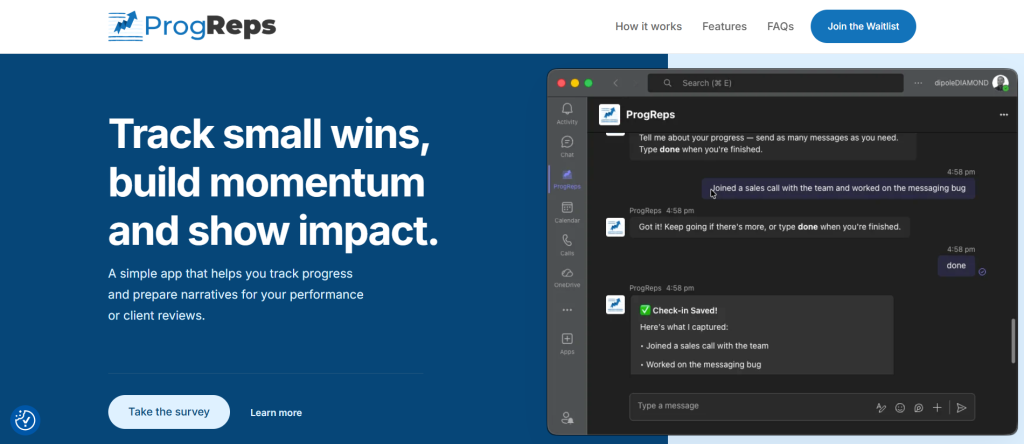
Progreps is a Microsoft Teams app that helps you track progress and prepare narratives for reviews. It is built for individual contributors, consultants, and client-facing professionals who want clean evidence of their work. The core promise is straightforward. Less effort now, much less stress later. It fits into the same Teams workflow you already use every day, so there is no separate app to remember to open.
How Progreps Works in Microsoft Teams
Progreps runs on a simple three-step loop. First, you set your priorities at the start of the week. Second, you capture your wins through scheduled check-ins as the week goes on. Third, you receive periodic progress reports built directly from those entries. Each report becomes a ready-made record for your next review. If you want early access before wider rollout, you can join the Progreps waitlist.
Step-by-Step: Using Progreps to Prepare for Your Next Performance Review
Start in week one by choosing your check-in cadence and categories. Match categories to how your role is actually evaluated. On a daily or recurring basis, log the action, the context, and the result. Each week, review your report and fill in anything you missed. Monthly or quarterly, group entries into themes like ownership, execution, and collaboration. Right before your review, pull your strongest stories and metrics into a draft.
What to Log in Progreps So Your Entries Turn Into Strong Review Bullets
Vague entries make weak review bullets. Specific entries make strong ones. These five templates give you a repeatable structure to log against.
| Template | Structure | Example |
|---|---|---|
| Simple win | What I did, and the result | Rebuilt the onboarding flow, cutting setup time in half |
| Impact plus metric | Baseline, change, timeframe | Support tickets dropped 30 percent over six weeks |
| Cross-functional collaboration | Who, what, outcome | Partnered with design to ship the new dashboard on time |
| Problem solved | Issue, action, resolution | Fixed the checkout bug before the launch deadline |
| Leadership or initiative | Initiative, adoption, impact | Started weekly syncs now used by three other teams |
Using a template each time keeps your entries specific instead of generic.
How Progreps Helps You Stand Out: Narrative Building
A narrative is more than a list of tasks. It is a coherent story of priorities, progress, obstacles, and outcomes. Weekly priorities in a Microsoft Teams app like Progreps create a through-line across the quarter. Small wins act as early signals of bigger impact later. That structure maps naturally to how most reviews are actually scored, across results, behaviors, and growth.
Manager-Ready Outputs: Turning Reports Into Your Self-Review
Once your reports are built, drafting your self-review takes far less time. Pick your top three outcomes, then attach the supporting wins and metrics. Map each win to the competencies expected at your level. Use the strongest points as talking points for the actual review meeting. Some people also turn their Progreps history into a standalone brag document.
Use Cases: Where Progreps Beats Generic Teams Workflows
Knowledge workers lose wins across meetings, messages, and scattered docs. Engineers and product teams often do invisible work, like incident response or quiet refactors, that never gets written down. Consultants and client-facing teams need a record of outcomes and relationship wins. Managers need visibility into coaching, hiring, and process work without digging through old calendars. If your team runs standups instead, it is worth comparing the best standup bot for non-technical teams in Microsoft Teams to see how the two approaches differ.
Comparing Options: Progreps vs Notes, OneNote, and Planner
Notes and OneNote are flexible, but they depend entirely on your memory and discipline. Planner is great for task completion, but weak on narrative and impact. Spreadsheets and docs work, but the manual formatting adds friction. Progreps combines scheduled capture, priority alignment, and automated reports in one Microsoft Teams app. If you are weighing it against a heavier team tool, this breakdown of Progreps vs Range covers the actual differences in depth.
Privacy, Control, and Trust in a Microsoft Teams App
Most entries will include project names, metrics, and stakeholder mentions. Before logging anything in any app, check its access controls, visibility settings, and export or delete options. Also check its data retention policy and admin controls. Avoid logging sensitive or confidential details. Treat it as a professional log of outcomes, not a private diary.
Getting Started With Progreps
Add the app inside Microsoft Teams to begin. Set your check-in frequency and preferred timing. Create your first set of weekly priorities, ideally three to five. Choose categories that match your role, like delivery, quality, or collaboration. Commit to two minutes a day for two weeks to feel the effect compound. If you are still comparing tools first, join the Progreps waitlist to get access as soon as it opens.
Common Mistakes That Make Performance Reviews Weaker
Waiting until the last week to remember everything is the most common mistake. Logging tasks instead of outcomes is a close second. Many people also miss metrics and skip before-and-after comparisons entirely. Others forget to tie their work back to team or business priorities. And some only track the big wins, losing the smaller story of steady progress. A Microsoft Teams app built around scheduled capture prevents most of these by design. For teams debating a personal tool against a monitoring one, this comparison of DailyBot vs Progreps for personal tracking versus team monitoring is worth a read.
Bottom Line: The Best Microsoft Teams App to Prepare for a Performance Review
Go back to the criteria from earlier in this article. Low-friction capture, scheduled prompts, priority alignment, and automated reports all matter. Progreps was built around exactly those four things. Some people compare it against other bots before deciding, including this look at Progreps as an alternative to Geekbot for individual professionals.
The value shows up over time, not on day one. Your first week of entries will feel small. By week four, you will have a real record instead of a vague memory. Try Progreps for your next two weeks. Use your first report as the foundation for your next review.
Frequently Asked Questions
What is the best Microsoft Teams app for performance review preparation?
The best option is one built specifically for impact tracking, not task tracking. Progreps captures wins on a schedule and turns them into review-ready reports. Generic task tools show completion, not value delivered.
Do I need to log something every single day?
No, but consistency helps the most. Progreps sends short prompts that take under a minute to answer. Skipping a day is fine, since you can always add entries later.
How is a performance review app different from a to-do list?
A to-do list tracks what you plan to do next. A performance review app tracks what you actually did and why it mattered. That difference is what turns entries into usable review evidence.
Can a Microsoft Teams app really replace a brag document?
Yes, if it produces structured reports automatically. Progreps organizes daily entries into summaries you can paste directly into a self-review. That removes most of the manual work a brag document usually requires.
Is it safe to log work details in a Teams app?
It depends on the tool’s access controls and data policies. Stick to outcomes and non-confidential metrics rather than sensitive information. Treat your log as a professional record, not a private journal.
How long before I see results from using Progreps?
Most people notice a difference after two to three weeks of consistent check-ins. The real payoff arrives at review time, when you already have organized evidence. That is much faster than reconstructing a quarter from memory.
