
Best Standup Bot for Non-Technical Teams in Microsoft Teams

Why Non-Technical Teams Struggle With Standups in Microsoft Teams (and Why Most Standup Bots Don’t Fix It)
A standup bot sounds like an easy fix until your team actually tries to use one. For technical teams living in Jira or GitHub, a standup bot slots right into the workflow. For marketing, customer success, ops, or HR teams, that same standup bot feels foreign. The prompts ask about sprints and tickets. Nobody on a non-technical team talks that way.
The result is inconsistent responses. People skip days. Threads get messy and nobody wants to scroll back through them. By week two, half the team has quietly stopped answering.
What non-technical teams actually need from a standup bot is different:
- They need clarity without jargon.
- They need low effort, so a check-in takes under a minute.
- They need accountability that does not feel like surveillance.
- And they need summaries a manager can actually read and use.
If you are evaluating a standup bot right now, you are really shopping for three things. Consistency. Reporting. A workflow your team will stick with past the first two weeks.
What “Best Standup Bot” Should Mean for Non-Technical Teams
The best standup bot is not the one with the most features. It is the one people actually respond to. It is also the one a manager can summarize in a few minutes, not an hour.
Here is a practical checklist for judging a standup bot before you commit to it.
Setup should take under ten minutes. No admin drama, no complicated configuration screens.
Prompts should be flexible. A good standup bot supports wins, priorities, client updates, and operational notes, not just yesterday and today.
Check-ins should feel light. If a response takes more than a minute, adoption drops fast.
Summaries should be clean. Daily recaps and weekly rollups should be readable without editing.
You need both personal and team-level views. Individuals want to see their own momentum. Managers want visibility across the whole group.
Noise control matters. The right standup bot lets you set cadence, quiet hours, and vacation mode.
It should live where the work happens. A standup bot that requires switching apps constantly will get ignored inside Microsoft Teams.
Finally, it should help with more than status. A strong standup bot supports performance conversations and client narratives too.
The 3 Standup Workflows That Actually Work in Microsoft Teams
Before picking a standup bot, pick your workflow. Most teams fail here first, not with the tool itself.
Workflow A is the classic async standup. It covers daily check-ins plus blockers. This suits distributed teams or teams already buried in meetings.
Workflow B is the wins and priorities standup. It is momentum focused rather than status focused. This fits customer success, marketing, ops, HR, and finance teams especially well.
Workflow C is the client or account update standup. It produces a weekly narrative instead of daily noise. This works best for agencies, consultancies, and account management teams.
A good standup bot should support all three through customizable prompts and flexible reporting. Start with the simplest workflow. Add structure only if your team actually needs it.
How to Evaluate a Standup Bot in 20 Minutes
You do not need weeks to test a standup bot. Run this trial script today.
Test one is adoption. Can a non-technical teammate respond without training?
Test two is prompt quality. Can you change the questions to match real work, like wins, priorities, and risks?
Test three is summary quality. Does the standup bot produce a clean recap without manual cleanup?
Test four is noise. Can you control cadence, quiet hours, and vacation mode?
Test five is narrative. Can you turn outputs into language ready for a performance review or client update?
Here is a scorecard you can actually use during a trial, not just read past.
| What You’re Testing | Pass Looks Like | Fail Looks Like |
|---|---|---|
| Team adoption | Teammate replies without help | Teammate asks what a field means |
| Prompt flexibility | You change questions in minutes | Prompts are locked to sprints or tickets |
| Daily summary | Reads clean, no edits needed | Wall of raw text, needs cleanup |
| Weekly rollup | Shows a clear story of the week | Just a list of daily entries |
| Noise control | You set quiet hours easily | Notifications pile up regardless |
| Narrative readiness | Copy-paste into a review works | You have to rewrite everything |
If a standup bot fails the summary and narrative tests, it is not the best fit. Status collection alone is not enough anymore for a non-technical team.
Why Progreps Is the Best Standup Bot for Non-Technical Teams in Microsoft Teams
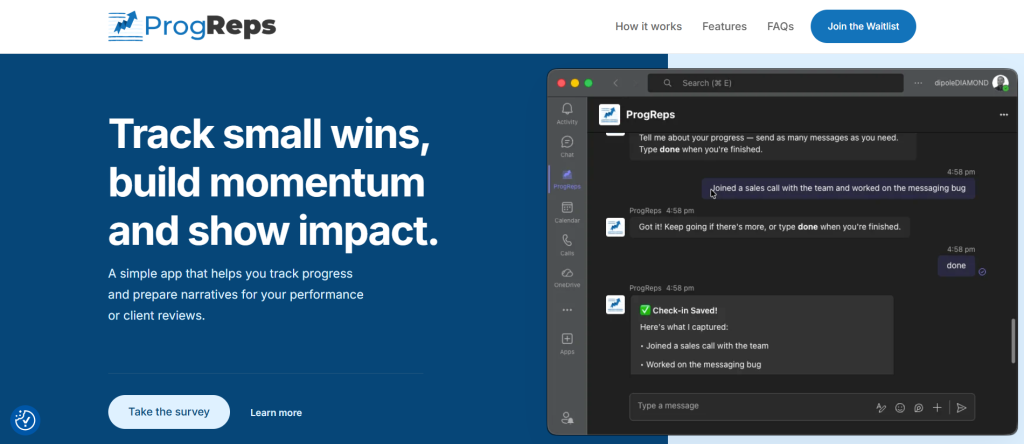
Most standup bots collect status updates and stop there. Progreps takes a different approach. It helps people capture wins and align them to weekly priorities, then turns that into reports you can actually use.
Map it against the checklist above. Priorities get set weekly. Wins get captured on a scheduled frequency. Reports get generated automatically, aligned to what actually mattered that week.
There is no Jira language required anywhere in the flow. Prompts feel human, not like ticket fields. Responses take less than a minute. That is the whole point of a standup bot for teams that are not engineering-heavy.
The value shows up on both ends. Managers get real visibility without chasing updates. Individuals build a record of their own impact. Teams stay consistent without adding another meeting to the calendar.
If you compare it against other tools in the category, the difference becomes clearer. Read this breakdown of DailyBot vs Progreps to see how personal tracking differs from team monitoring. There is also a detailed look at Geekbot vs Progreps for individual progress tracking specifically.
How Progreps Works in Microsoft Teams
The routine is simple and only has three steps.
Step one, set your priorities. At the start of the week, define what matters most to you.
Step two, capture your wins. Log small wins on a scheduled frequency, a few times a week or daily.
Step three, get your progress reports. Weekly rollups show what you accomplished and how it aligns with your priorities.
This solves the classic end-of-week scramble. You are not trying to remember everything on a Friday afternoon. The structure also doubles as an async standup bot for teams that never wanted a formal one.
Use Cases: Where Progreps Beats a Traditional Standup Bot
Customer success teams can track renewals, escalations handled, and customer outcomes. Managers get a weekly narrative instead of a scattered thread.
Marketing teams can capture campaign milestones, experiments shipped, and what they learned. The weekly recap writes itself.
Operations and people ops teams can log process improvements and hiring progress. Visibility stays high without adding meetings.
Sales and account management teams can record client touchpoints and proposal progress. Output is ready for client review, not just internal status.
Leadership and managers use these reports to spot blockers early. They can recognize contributions publicly and prepare review documents fast.
This is also where the record you build becomes genuinely useful. Learn more about what an impact export is. It can support your career, not just your team’s reporting.
What to Set Up First
Start with three check-ins a week. Move to daily only if it feels natural for your team.
Recommended prompts are simple:
- Ask for the top win since the last check-in.
- Ask what the person is focusing on next.
- Ask about blockers or risks.
An optional shoutout prompt helps too.
Keep team norms light. Responses should be short and specific. Blockers should come with a next step, not just a complaint.
Managers should build a habit around this. Read the weekly report. Highlight one or two wins publicly. Remove one blocker if you can. That habit is what drives adoption of any standup bot long term.
Standup Bot Alternatives in Microsoft Teams
A manual Teams thread works for very small teams. It breaks the moment you need summaries or history.
Forms and spreadsheets are more structured but add friction. People forget to fill them out, and momentum disappears.
Task managers track planned work, not what actually happened. They are weak on narrative and impact.
Other standup bots are fine for pure status tracking. Many are weak on performance or client-ready reporting though.
If your real pain point is weekly summaries, pick a standup bot built for wins and reporting.
How to Roll It Out Without Annoying Your Team
Day zero, pick one workflow. Wins and priorities works best for most non-technical teams.
Day one, set weekly priorities together. Explain why you are doing this, fewer meetings and more visible impact.
Days two through six, run short scheduled check-ins. The manager should model good responses first.
Day seven, review the weekly progress report as a group. Decide together if the cadence needs tweaking.
Track response rate, time saved in meetings, and the quality of the weekly narrative. Fewer “what did we actually do this week” moments is the real signal it is working.
Closing: Choose a Standup Bot That Creates a Weekly Story of Impact
Non-technical teams need a standup bot built around simplicity, clean summaries, and real narrative.
Progreps combines priorities, wins, and weekly reports directly inside Microsoft Teams. That combination is what separates a status tool from one that actually builds a record of impact.
If your team has been putting off fixing recurring standups, this is a good place to start. It also pairs well with fixing how reviews get written in the first place. Take a look at how to fix recency bias in your performance review once your reports build up.
The easiest way to see if this fits your team is to try it with a small pilot group. Join the Progreps waitlist for early access and measure response rate and weekly report usefulness for yourself.
Do I have to log something every day to use a standup bot?
No, but it works better if you do. A good standup bot only takes a minute per prompt. You capture what moved forward, then move on with your day.
How is a standup bot different from a to-do list or task manager?
A to-do list tracks what you plan to do. A standup bot captures what you actually did. That record becomes the basis of a real impact narrative over time.
What happens if I forget to log my wins in a standup bot?
Most good tools send gentle reminders. You can usually add entries later too, so nothing important gets lost from the week.
Will using a standup bot feel like extra work for a non-technical team?
It should not. A well built standup bot replaces the mental effort of remembering everything later. Less effort now means far less stress at review time.
How does a standup bot help with performance reviews specifically?
Daily entries get organized into clear weekly summaries automatically. By review time, you already have structured, specific examples of your impact ready to use.
