
How Progreps Automatically Builds Your Year-End Performance Summary

A Year-End Performance Summary should never take three days to piece together every December. Most professionals still build theirs that way. They scroll through old chat threads, dig through email folders, and try to remember what actually happened back in March. That approach turns a simple task into a stressful scramble. Progreps was built to remove that scramble completely. Instead of reconstructing a year from memory, the material is already waiting for you. This article walks through exactly how Progreps turns small weekly entries into one finished Year-End Performance Summary. It also explains why that process holds up better than doing it by hand.
What a Year-End Performance Summary Actually Is
A Year-End Performance Summary is a structured record of what you accomplished over twelve months. It is not a list of tasks you completed. It shows outcomes, the impact behind them, and how they connect to your priorities. A strong one reads like a narrative, not a spreadsheet. Reviewers and managers use it to judge growth, not just activity. That distinction matters more than most people realize until review season arrives. By then, it is usually too late to fix a year of thin notes.
Why Most People Scramble to Build One in December
Memory fades fast, even for people who did excellent work all year. By December, the wins from January already feel foggy. Chat logs are searchable, but sorting through them takes hours. Notes apps only work if you remember to update them consistently. None of these methods were built to produce a real Year-End Performance Summary. They were designed for the moment, not for twelve months later. The result is a review full of vague language instead of real evidence. People end up underselling a year of genuinely strong work, simply because they cannot recall the details.
The Weekly System Behind Every Progreps Year-End Performance Summary
Progreps runs on a simple loop that repeats every week. First, you set your priorities for the week ahead. Second, you capture your wins through short scheduled check-ins. Third, you receive a report tying those wins back to your priorities. That loop runs quietly in the background all year long. By December, it has already produced fifty-two weeks of structured material. Your Year-End Performance Summary is really just the compiled version of that material. Nothing needs to be reconstructed, because nothing was ever lost in the first place.
Step by Step: How Progreps Turns Weekly Wins into a Year-End Performance Summary
The process starts small and builds without extra effort from you. Each week, a short prompt asks what moved forward. You answer in under a minute, and the entry gets logged automatically. Weekly reports then roll those entries up against your stated priorities. Monthly reports group those weekly reports into broader themes. Common categories include delivery, collaboration, and ownership, the same areas most reviews score. At year end, Progreps compiles every monthly report into one continuous narrative. The result is a Year-End Performance Summary built from real entries, not guesswork.
A Real Example: From Weekly Entry to Finished Line
Raw entries rarely look impressive on their own, and that is fine. A Monday check-in might just say a client escalation got resolved. A Wednesday entry might mention a dashboard shipped a day early. On their own, these look like small, forgettable moments. Inside Progreps, they get tied to that week’s priority automatically. By the monthly rollup, the pattern becomes visible: faster resolution times, consistent early delivery. By year end, that pattern becomes a specific line in your Year-End Performance Summary, backed by dated proof instead of a vague claim.
Manual Method vs Progreps: What It Actually Costs to Build a Year-End Performance Summary
The real difference between the two approaches shows up in time, not effort alone.
| Stage | Doing It Manually | Building It Inside Progreps |
|---|---|---|
| Finding what you did | Scrolling through chat, email, and old notes for hours | Already logged in weekly entries, searchable instantly |
| Quantifying the impact | Guessing at numbers you can no longer verify | Metrics captured the week they happened |
| Structuring the narrative | Rewriting scattered notes into a coherent story | Monthly reports already grouped by theme |
| Formatting for delivery | Formatting everything by hand the night before | Compiled automatically into one finished document |
| Total time near year end | Two to three days, often under deadline pressure | About twenty minutes to review and polish |
Most of that gap comes from timing, not intelligence or effort. Entries captured the week they happened need no reconstruction later.
What Goes Into a Strong Year-End Performance Summary
A strong Year-End Performance Summary usually follows a similar patter:
- It opens with a results section, showing specific outcomes and metrics.
- It highlights two or three key strengths with real context behind them.
- It names growth areas honestly, along with what changed because of them.
- It closes with goals for the year ahead.
Progreps entries are structured from the start to feed each of these sections. You are not reverse engineering a narrative from scratch every December.
How Progreps Keeps Your Year-End Performance Summary Accurate All Year
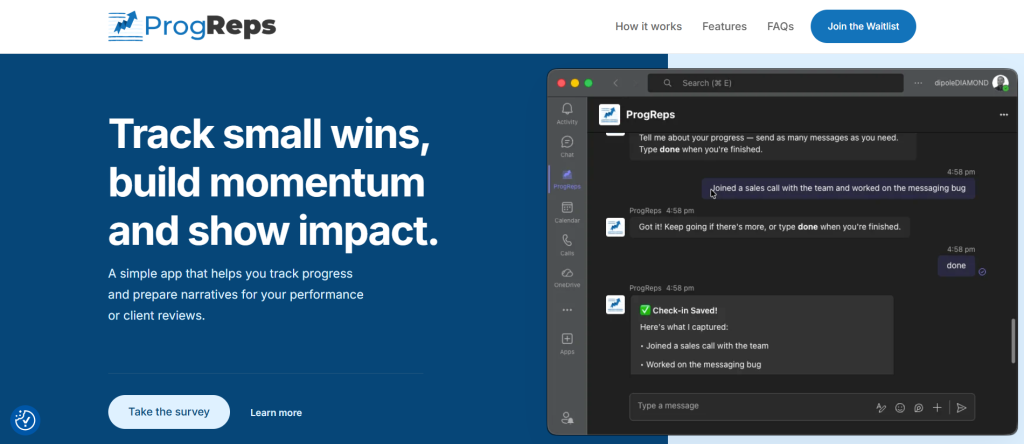
Accuracy depends on consistency, not perfection. Progreps sends short reminders if you miss a check-in. You can still add entries later without losing anything. Vacation mode pauses prompts cleanly during time off. Every entry stays tied to the week it actually happened. That timestamp accuracy is what makes the eventual Year-End Performance Summary trustworthy. A reviewer can tell the difference between real detail and reconstructed memory, even without saying so out loud.
Comparing Progreps to Other Ways of Building a Year-End Performance Summary
Most tools inside Microsoft Teams were not built for this job. Task managers show what got marked done, not the value it created. Spreadsheets require constant manual updating that most people abandon by March. Generic note apps depend entirely on your own memory and discipline. Want a deeper breakdown of what a real solution should include? This guide to the best Microsoft Teams app to prepare for a performance review covers the full criteria. Individual professionals comparing standup-style tools may want to read about Progreps as an alternative to Geekbot for individual professionals. Geekbot was built for team status updates, not personal records. For a closer look at a heavier team platform, this breakdown of Progreps vs Range covers the real differences.
Who This Year-End Performance Summary Workflow Is Built For
Individual contributors preparing for a formal review get the clearest benefit. Consultants and client-facing professionals can turn weekly wins into client-ready updates too. Managers use the same structure to document coaching and process work across a quarter. Teams that already run standups can layer this on top without adding meetings. If your team is still choosing a check-in workflow, start here first. This comparison of the best standup bot for non-technical teams in Microsoft Teams covers what to look for. Everyone in these groups ends up with the same result. A finished Year-End Performance Summary that took no extra effort to assemble.
Getting Your Year-End Performance Summary Ready Before It Is Due
The earlier you start logging, the stronger your Year-End Performance Summary becomes. Even three months of consistent entries beats a year of vague memory. Set your first three priorities this week, and let the check-ins do the rest. By the time your review is scheduled, your summary will already exist. You can join the Progreps waitlist for early access to start building yours now. The next review cycle will feel completely different.
What is a Year-End Performance Summary?
A Year-End Performance Summary is a structured record of your accomplishments across an entire year. It includes outcomes, metrics, and context, not just a list of completed tasks. Managers and reviewers use it to evaluate growth and impact over time.
How does Progreps build a Year-End Performance Summary automatically?
Progreps compiles your weekly priorities, captured wins, and generated reports into one document. Each week adds structured material, and monthly reports group it into clear themes. By year end, the summary already exists instead of needing to be written from scratch.
Do I need to log wins every day for an accurate Year-End Performance Summary?
No, consistency matters more than daily perfection. Missed days can be added later without losing anything. Even three check-ins a week builds a usable record over a full year.
Can I edit my Year-End Performance Summary before I submit it?
Yes, Progreps generates a structured draft built from your real entries. You can review it, reorder sections, and adjust wording before using it. That makes it a starting point, not a finished document you cannot touch.
How is a Year-End Performance Summary different from a weekly progress report?
A weekly progress report covers a single week against that week’s priorities. A Year-End Performance Summary combines every weekly and monthly report into one narrative. It shows growth and pattern, not just a single snapshot.
When should I start tracking to have a complete Year-End Performance Summary by December?
The earlier the better, ideally at the very start of the year. Starting mid-year still produces a stronger summary than starting from memory in December. Even a few consistent months beat reconstructing an entire year from scratch.
