
How To Deploy A Secure Microsoft Teams Bot with Zero Inbound Internet Access
Custom Microsoft Teams apps are a practical way to extend the platform beyond basic collaboration, transforming it into a hub for bespoke work tools that drive operational efficiency.
In a recent client implementation, we faced a strict security constraint: secure a custom Teams app by disabling public access on the Azure Bot Service and deploying the bot itself on a virtual machine (VM) within a private virtual network with no inbound internet access.
In this post, I explore our architectural approach and share some key lessons learned along the way.
TL;DR: Securing an Azure Bot for Microsoft Teams requires a nuanced understanding of inbound vs. outbound network traffic, as well as the distinct roles played by the Azure Bot Service resource and the bot application itself (built using the Microsoft Teams SDK).
Understanding the Message Flow
To secure the architecture, we first need to review the end-to-end flow of how a message travels from a user to the bot and back.
Inbound Flow (Steps 1–5)
- User Action: A user sends a message within the Microsoft Teams client.
- Channel Routing: The Teams channel service receives the message and identifies (via the bot’s App ID) that it is intended for a bot. Crucially, it does not call the bot directly.
- The Relay: The Teams channel hands the message off to the Bot Connector service (the Azure Bot Service relay).
- Authentication: The Bot Connector attaches a signed JSON Web Token (JWT) to the request’s
Authorizationheader and sends aPOSTrequest to the bot’s configured messaging endpoint (https://<domain>/api/messages). - Receipt: The bot app receives the request at
/api/messages.
Outbound & Validation Flow (Steps 6–10)
- Token Verification: The Teams SDK validates the JWT to confirm the request genuinely originated from the Bot Connector. It does this by fetching public signing keys from the Bot Framework token endpoint (
login.botframework.com) to verify the token signature. - Processing: Once validated, the bot processes the message and generates its response.
- The Reply: The bot
POSTs its reply back to the Bot Connector service via the Service Message Bus Allocation (SMBA) URL (*.trafficmanager.net), rather than communicating with Teams directly. - Delivery Relay: The Bot Connector relays the response back to the Teams channel service.
- Completion: The user sees the reply in Teams, completing the conversation turn.
The Security Dilemma
Analyzing the flow above highlights two critical requirements for a successful Teams bot deployment:
- Inbound: The configured messaging endpoint must be secure (
https) and publicly accessible to receive traffic from the Bot Connector. - Outbound: The bot app must be able to reach
login.botframework.comandsmba.trafficmanager.net(both public internet addresses) to validate tokens and send replies.
This created a dilemma: how do we meet these requirements while honoring the client’s mandate to isolate the bot app on a VM inside a secure virtual network with no internet access?
Our solution was to strictly block inbound internet access directly to the VM, while allowing tightly scoped outbound internet access restricted only to the required Bot Framework domains.
The Final Architecture
Here is an overview of the resulting secure architecture:
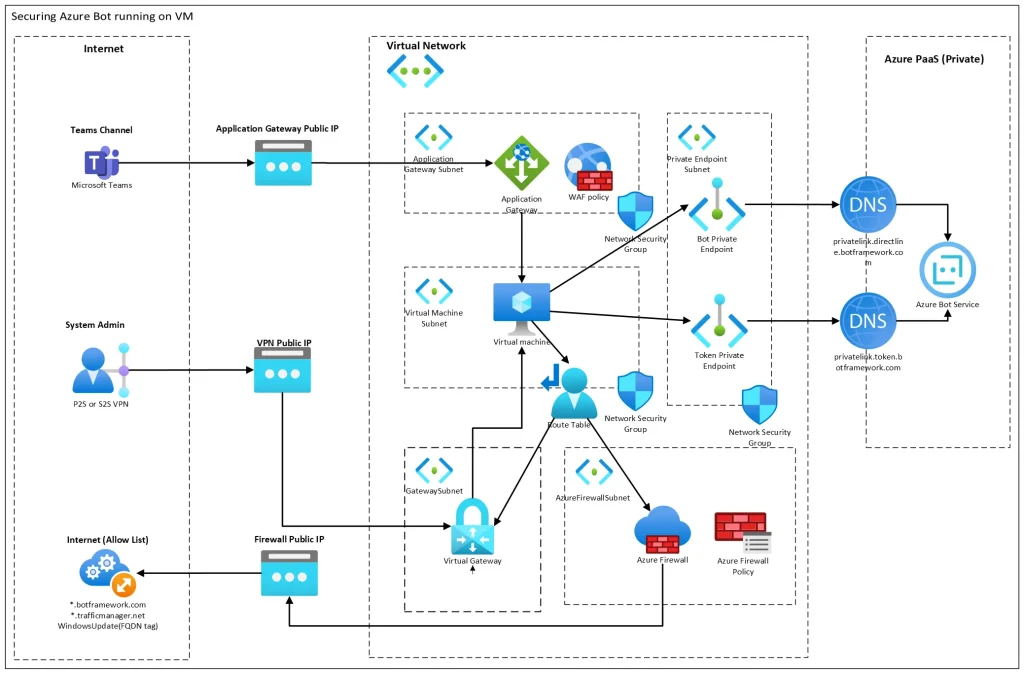
- Inbound Edge: Microsoft Teams sends messages to a public Azure Application Gateway, which serves as the sole resource on the internet edge. The gateway forwards traffic privately to a Windows VM running the bot app; the VM itself has no public IP address.
- Internal Azure Services: The bot connects to all required Azure resources—such as Azure Key Vault, Azure SQL, Azure Storage, and the Azure Bot Service—exclusively through Private Endpoints.
- Outbound Filtering: Outbound internet access from the VM is restricted to a granular list of allowed domains using Azure Firewall.
- Management: Administrative access to the VM is handled securely over a VPN.
Key Lessons Learned
During implementation, we uncovered two critical nuances that are vital for anyone designing a similar architecture:
1. Clarifying “Disable Public Access”
The “Disable public access and use private access” setting on the Networking plane of the Azure Bot Service resource applies only to the communication between your bot app (using the Teams SDK) and the Azure Bot Service resource itself.
It does not affect communication between the Bot Connector and the Teams channel. As established in the message flow, that channel communication must remain publicly accessible to receive payloads from Microsoft’s infrastructure.
2. Outbound Filtering with FQDNs and Wildcards
When configuring Azure Firewall to restrict outbound internet traffic from the VM, you must filter by Fully Qualified Domain Name (FQDN) rather than static IP addresses, because the required public endpoints do not use fixed IPs.
Additionally, we discovered that the smba.trafficmanager.net URL dynamically resolves to regional aliases during runtime. To prevent intermittent connection failures, you must allow the wildcard FQDN *.trafficmanager.net rather than explicitly targeting smba.trafficmanager.net.
