
Best Daily Work Log Apps For Professionals In 2026
Keeping a daily work log used to mean scribbling notes in a notebook or dumping tasks into a spreadsheet nobody ever opened again. In 2026, with remote and hybrid work now the default for most knowledge workers, that approach is costing people more than they realize.
Missed promotions, vague client updates, performance reviews where you can’t remember what you actually did in Q1. The problem isn’t effort. It’s capture. The right app makes logging feel like a 60-second habit rather than a chore you keep skipping.
This article covers the best daily work log apps for professionals this year, how to pick one based on your actual situation, and a workflow you can start using tomorrow.
Why daily work logs matter more in 2026
Performance reviews have shifted. Most managers and clients don’t care how many hours you clocked. They want to know what moved. What decisions you made. What problems you solved and what the outcome was. That shift from “hours tracked” to “impact captured” is why logging has become a career skill, not just a personal productivity habit.
The common mistakes professionals make are worth naming. Logging too much (every meeting, every email) turns your log into noise. Logging too little means there’s nothing there when review time comes. No consistent structure makes entries hard to reuse. And most people keep logs so private they never think to export or share them when it matters.
The apps below solve for different versions of this problem.
What a good daily work log app should actually do
Before getting into specific tools, here’s what separates a useful work log app from one that becomes abandoned after two weeks.
Fast capture is non-negotiable. If it takes more than 90 seconds to open and log something, you won’t do it consistently. Beyond that, good apps offer search, tags or project labels, reminders, and some way to export or share entries. For teams, you also want templates that enforce a consistent structure, integrations with tools like Teams, Slack, Jira, or Asana, and clear controls over who sees what.
AI features are worth calling out specifically because there’s a lot of noise here. Summarization, weekly narrative building, and theme detection across entries are genuinely useful. Generic “AI writing assistants” that just rephrase your notes are not.
Privacy and data ownership matter more than most people think. Know where your data lives, who can access it, and whether your company’s IT policies allow the tool in the first place.
Quick cheat sheet: which app fits which professional?
Rather than making you read through every tool before knowing which one applies to you, here’s a mapping based on role and primary need.
| Professional Type | Primary Need | Best Fit |
|---|---|---|
| Consultant or client-facing role | Performance narratives + client reporting | Progreps |
| Engineer in Atlassian environment | Delivery traceability + technical decisions | Jira + Confluence |
| Freelancer billing hourly | Accurate time records + invoice exports | Toggl Track |
| Operator, PM, or founder | Log + internal wiki in one place | Notion |
| IC who lives by task lists | Simple completed-task log + reflection | Todoist |
| Agency or ops team | Team-wide visibility + project alignment | ClickUp |
| Corporate professional in Microsoft stack | Fast notes + meeting capture | OneNote |
| Engineer or researcher who wants privacy | Local-first, private, long-term knowledge | Obsidian |
1. Progreps (Best for tracking small wins and turning them into impact narratives)
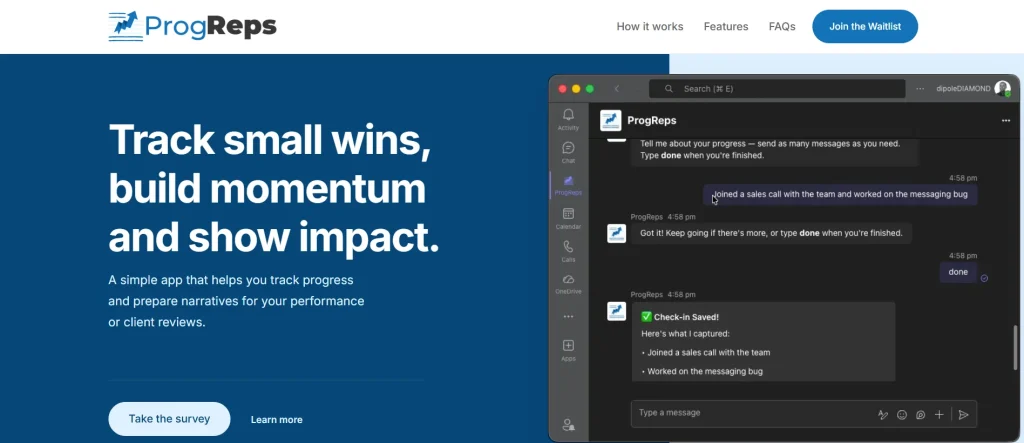
Progreps is a Microsoft Teams app built specifically for high-ownership professionals who need to show impact, not just report activity. The flow is simple: capture a small win, let the app organize it, and get a structured impact narrative you can use for performance reviews, promotion packets, or client quarterly reviews.
What makes it different from generic note-taking is the category structure. You define three to five buckets (delivery, customer impact, revenue, quality, leadership) and every entry goes into one. Over time, your log becomes a searchable evidence base, not a diary.
For consultants who have to justify their value to clients every quarter, or for ICs who know their work speaks for itself but struggle to articulate it during review season, Progreps removes the “what did I even do this year?” scramble.
Sixty-second entries during the week turn into a weekly narrative export by Friday.
It’s built by NotGeneric, a service from dipoleDIAMOND, a company that builds bespoke Microsoft Teams apps and AI agents for reducing workflow friction. That context matters because Progreps isn’t a side feature of a bigger platform. It was designed specifically for this problem.
2. Notion (Best all-in-one work log and knowledge base)
Notion works well as a daily work log when you set it up as a database with consistent properties: date, project, win, blockers, next steps. The strength is that your log lives in the same place as your notes, docs, and project references. Cross-linking entries to related pages makes it genuinely useful over time.
The weakness is friction. Notion rewards people who enjoy building systems. If you just want to open something, type three lines, and close it, Notion will tempt you to keep customizing instead of actually logging. Operators, PMs, and founders who want their log and their wiki in one place get the most out of it.
3. Microsoft OneNote (Best for simple, searchable daily notes in Microsoft ecosystems)
OneNote still earns its place in 2026. One page per day, a consistent header (Top 3, Wins, Blockers, Follow-ups), and reliable search across everything you’ve ever written. It integrates naturally with Outlook and Teams meetings, which means you can pull meeting notes directly into your daily log without copying anything.
The trade-off is that OneNote doesn’t give you analytics or automated summaries. It’s a notepad, not a reporting tool. For corporate professionals who don’t want to change tools but want a consistent daily habit, that’s exactly what they need.
4. Obsidian (Best for private, local-first work logs and personal knowledge management)
Obsidian stores everything as markdown files on your own device. No cloud, no subscription required to keep your data. The Daily Notes plugin gives you a new page every day with whatever template you set up, and tagging by project or client keeps things organized over months and years.
Engineers, researchers, and writers who want a long-term personal knowledge graph get a lot out of Obsidian. The learning curve is real, and collaboration requires additional plugins or workarounds. But if privacy and full data ownership matter to you, no other tool comes close.
5. Todoist (Best for task-based daily work logs that stay realistic)
Todoist works as a work log when you treat your completed tasks as the log itself, then add a short end-of-day reflection comment to the day’s entry. Labels for projects and a “completed today” filter give you a clean record of what actually shipped.
It’s low friction and honest. You’re not creating parallel systems. You’re turning what you already do (manage tasks) into documentation. The gap is context. Completed tasks don’t capture why something took longer, what decision was made, or what the outcome was. Adding a brief reflection note each evening closes most of that gap.
6. ClickUp (Best for teams that want work logs tied to projects and deliverables)
ClickUp makes sense for agencies, ops teams, and product teams that want everyone logging in the same place against the same structure. A “Daily Update” doc template tied to completed tasks, combined with automated reminders, creates team-wide visibility without requiring a separate reporting workflow.
The overhead of setting ClickUp up correctly is real. But once it’s running, managers and clients can see progress without chasing anyone for updates.
7. Jira and Confluence (Best for engineering organizations on Atlassian)
For software teams, the best daily work log is often the one already embedded in their delivery tools. Log decisions and blockers in Confluence. Keep “what shipped” in Jira. Together, they create an audit trail that’s useful for retrospectives, stakeholder reports, and performance conversations.
Non-technical roles find this setup clunky. But for delivery organizations and technical program managers, it’s the most traceable option available.
8. Toggl Track (Best for billable time logs and client invoicing)
Toggl Track is time tracking, not narrative logging. But for freelancers and agencies billing hourly, it functions as a work log when you add short descriptions to each time entry. Weekly exports double as invoices and activity reports.
The gap is qualitative context. Toggl tells you what you worked on and for how long. It doesn’t capture wins, decisions, or outcomes unless you deliberately add that layer.
How to choose the right daily work log app
Five questions narrow it down quickly.
What are you optimizing for? Performance narrative, project visibility, billing, and personal clarity each point to a different tool. Get clear on this first before anything else.
Where do you already work? The best daily work log app is usually the one closest to where your work already happens. A Teams user adding a standalone app creates friction before they’ve even started.
How much structure do you want? Freeform notes, templates, and database fields suit different thinking styles. Some people log better when a blank page greets them. Others need fields to fill in or they’ll skip it.
Who needs to see your log? Private logs, manager-facing summaries, and client-facing reports have different requirements around formatting, permissions, and export options. Know your audience before committing to a tool.
And finally: what is the fastest way for you to open it and type something? Stickiness comes from low friction. If one option is slightly faster to open than another, that small difference usually determines whether the habit survives past week two.
A daily work log workflow you can copy
Morning, two minutes: write your top three outcomes for the day and one risk to watch.
During the day, one minute each time something notable happens: capture it immediately rather than trying to reconstruct everything at 5pm from memory.
End of day, five minutes: wins shipped, blockers, decisions made, next steps, with links to relevant threads or tickets.
End of week, ten minutes: write a short narrative covering impact, any relevant numbers, what you learned, and what’s coming next.
The habit works when everything goes in one place. Tool-hopping between a notes app, a task manager, and a separate journal is where most daily work log systems collapse.
Common mistakes that make work logs useless
Logging activities instead of outcomes is the most common failure. Fix it by adding a “so what?” line to each entry so every item has a point.
Inconsistent categories make entries hard to reuse at review time. Fix it with a four-field template: win, evidence, blocker, next. Same structure every day.
No proof means nothing is verifiable when it matters. Link tickets, share numbers, attach screenshots. Vague entries help no one, including you.
Forgetting to review means entries pile up without ever being turned into anything useful. A weekly calendar block for export or review is the easiest fix, and it takes ten minutes.
The best daily work log app is the one you’ll actually use
Progreps is the strongest pick for professionals in Microsoft Teams environments who need to turn their daily work into performance narratives and client reports.
Notion, Obsidian, OneNote, ClickUp, Jira, Todoist, and Toggl each earn their place depending on your role, your stack, and how you think about logging.
The actual recommendation is simple: pick one tool from this list, use one template for seven days, and do one weekly review. Daily logs compound. Small wins captured consistently become a story you can prove when it counts.
Frequently Asked Questions
What is a daily work log and why should professionals keep one?
A daily work log is a structured record of what you worked on, what you accomplished, what blocked you, and what decisions were made on a given day. Professionals keep them to prepare for performance reviews, justify value to clients, track progress on long-term goals, and avoid the common problem of not being able to recall what they actually did over a quarter or year.
How long should a daily work log entry take?
A good daily work log entry should take between two and five minutes. If it’s taking longer, your template has too many fields. The goal is consistent capture, not comprehensive documentation. Brief, structured entries written daily are more useful than detailed entries written twice a month.
Is a daily work log the same as time tracking?
No. Time tracking records how long you spent on tasks. A daily work log captures what happened, why it mattered, what decisions were made, and what came out of it. Toggl Track and similar tools do time tracking well. Apps like Progreps focus on the outcome and narrative side, which is what actually helps during performance reviews and client conversations.
Can I keep a daily work log in Microsoft Teams?
Yes. Progreps is built specifically for this inside Microsoft Teams. It lets you capture small wins directly within Teams, organizes them by category, and generates structured narratives for performance reviews and client reporting without leaving the platform you’re already working in.
How do I make a daily work log habit actually stick?
The two factors that make or break the habit are friction and reminders. Pick the tool that’s fastest for you to open and type in. Set a recurring reminder at the same time each day, usually end of day. Use a fixed template so you don’t have to decide what to write every time. And schedule a weekly review so entries get used rather than just accumulating.


